This Week's UX Reading #1
Published: Monday, May 20, 2026
As artificial intelligence becomes embedded in every digital product, the challenge for UX designers is no longer whether to use AI, but how to design with it responsibly. This week's curated reading explores the principles of designing AI-first products that actually improve user experience.
Article 1: Designing AI-First Products and Improving the User Experience
Source: UX Matters
Author: Irov Vaul
Why This Matters
AI-first products are reshaping how we think about design fundamentals. This article breaks down exactly what makes a product "AI-first" versus just adding AI as a feature afterthought. The key insight: AI should work as a supportive partner, not a replacement for user agency.
What Are AI-First Products?
An AI-first product puts artificial intelligence at the center of the user experience. AI is not a tool that is in the background. Instead, it directly shapes how people use a product, making it feel more helpful and adaptive.
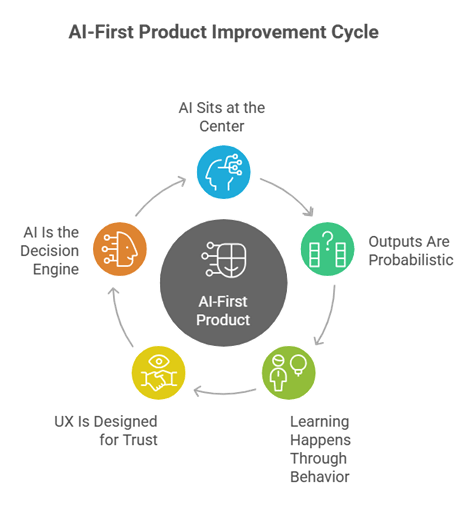
The article identifies a product-improvement cycle for AI-first products with AI at the center and five connected stages:
The five core characteristics:
- AI sits at the center of core workflows — Workflows change based on context. Systems don't follow rigid steps, but adapt as users work. They react to real signals: intent and goals, past behaviors, timing and situational context.
- Outputs are probabilistic, not fixed — Unlike traditional software with fixed outputs, AI-first products can give different results for the same inputs because they work with probabilities.
- Learning happens through user behaviors — AI systems learn from real usage, becoming more relevant over time. They learn from what users accept, change, or ignore.
- UX design focuses on user trust and recovery — AI can make mistakes. Good AI-first experiences always include clear explanations, visible confidence signals, and simple recovery options.
- AI is the decision engine — In a true AI-first product, AI is not an add-on. It decides what the user sees and how the product responds.
Design Principles for AI-First UX
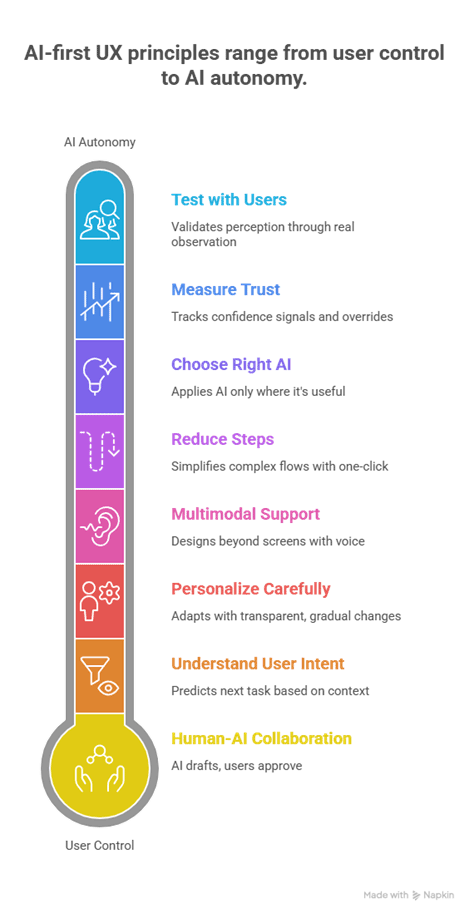
The article presents a vertical scale of AI-first UX principles, highlighting the balance between user control and AI autonomy:
Eight key design principles:
1. Understand user intent Focus on outcomes, not clicks. Use contextual signals (location, history, device state) to reduce repeated inputs. Study behavior patterns to predict what users might do next. Suggest actions before users ask.
Example: A travel app predicts a traveler's desired seat and hotel from past trips. Booking is faster with fewer decisions.
2. Choose the right AI capabilities Adding AI everywhere does not improve the user experience. Choose AI features meticulously. Purpose always matters more than feature hype.
3. Design human-AI collaboration AI works best when it supports users instead of replacing them. Suggest, don't decide. Explain decisions. Share control.
Example: A design platform suggests layouts, but the designer selects and edits the final version.
4. Reduce the user's steps and workload Strong AI-first UX design reduces user effort and repetition. Simplify processes. Anticipate user needs. Prioritize efficiency over novelty.
Example: An AI-powered design tool can automatically handle repetitive tasks like background removal, allowing creators to focus on layout and storytelling.
5. Personalize gradually and transparently Personalization increases engagement, but user trust must come first. Introduce changes slowly. Explain why users are seeing suggestions. Allow users to reset or override personalization.
6. Support multimodal and zero-UI interactions AI-first experiences extend beyond screens. Support voice and gestures. Support background actions. Always include confirmations and undo options.
7. Track AI and UX metrics Traditional UX metrics are not enough for AI systems. Go beyond accuracy. Track overrides, corrections, and user hesitation. Monitor user engagement and feedback for frustration. Iterate continuously.
8. Test with real users Synthetic data cannot reveal users' emotions or trust issues. Observe user interactions. Collect qualitative insights through interviews and usability testing. Refine decisions based on user trust.
Real-World Examples
The article shows how these principles apply across different product types:
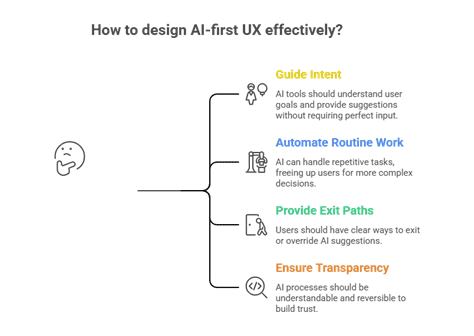
- Writing tools — AI writing tools focus on what to say. Provide light direction rather than long prompts. All suggestions remain optional and editable.
- Support platforms — AI support tools resolve common issues quickly. They act only when confidence is high. Whenever uncertainty appears, pause and involve humans.
- Design tools — AI design tools help processes move faster without taking control. AI might suggest layouts and variations. The user chooses what suggestions to use.
Across all examples, one rule remains clear: the AI assists and accelerates work. The user decides and owns outcomes.
The Future: Calm and Invisible AI
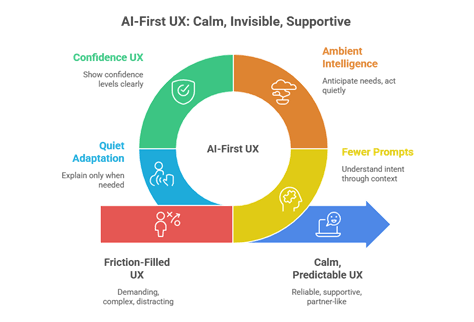
As AI advances, the best experiences will become quieter and less demanding:
The future includes:
- Fewer explicit prompts — Systems understand intent through context, making interactions faster.
- More ambient intelligence — AI works in the background, preparing outcomes before users ask. It steps in only at the right moments.
- UX patterns focusing on user confidence — Users need to know when the AI is sure and when they should review outputs.
- Quiet adaptations with clear explanations — User interfaces adapt silently. They avoid over-explaining while preserving transparency.
Key Takeaway
"Designing AI-first products is not about showing how smart a system is. Instead, AI-first products focus on helping people understand what is happening and why. When users are well informed, they feel calm and confident. As a result, they trust a product more and use it with confidence."
Why You Should Read It
If you're working on any AI-enabled product, this article provides a practical framework that goes beyond hype. The distinction between "AI as automation" and "AI as partnership" is especially important for teams building enterprise products. The author shows that successful AI-first design requires rethinking workflows entirely—not just adding intelligent features to existing interfaces.
The real-world examples and visual frameworks make abstract concepts concrete. Whether you're designing writing tools, support platforms, or design applications, the core principle is consistent: AI assists and accelerates, but users decide and own outcomes. When design teams follow this rule, users feel capable rather than replaced.
Categories: AI, UX Design, Product Strategy
Read Time: ~10 minutes
Keywords: AI-first design, user trust, human-AI collaboration, UX principles, product design
Comments ()